
Step 5: Plan for the Known Unknowns – Project Planning
Creative projects often go down to the wire. They’re complicated by nature, and there can be huge unknowns, especially on the ‘cutting edge’. We’ve gathered tools to help you plan, keep communication positive between creators and client, build a timeline, and assess risks, with a contingency even for the unknown unknowns. To start, here’s an outline of what a project plan should include…
Project Plan Outline:
- Project purpose
- Project team – roles & responsibilities matrix
- Risk Analysis Table
- Project Communications, tracking progress
- Version control
- Project timeline – Gantt chart, key milestones
- Project team directory
Project purpose:
A day without a purpose can be nice now and then, when you want to relax. A project without a purpose, though, ends up running around like a headless chicken.
What the project aims to achieve, for whom, how and why: that’s the main ingredient of this part of the plan.
Project team – roles & responsibilities matrix:
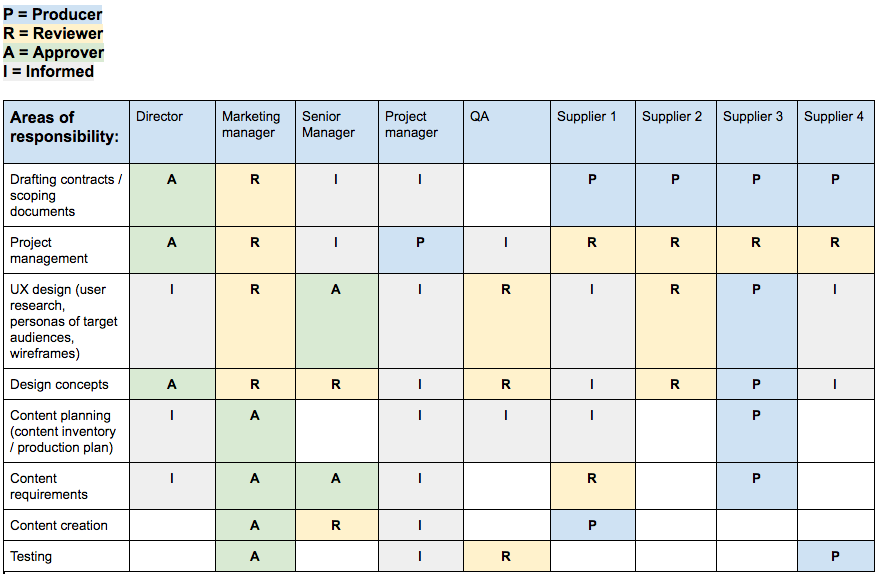
Clearly defined roles and responsibilities, agreed at the kick-off meeting, really matter. Otherwise team members can end up with different expectations of the work, and the frustration that follows isn’t a healthy ingredient for a harmonious, productive working relationship.
Here’s an example of a responsibilities matrix:
Risk Analysis Table:
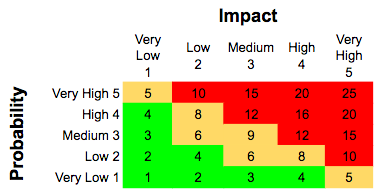
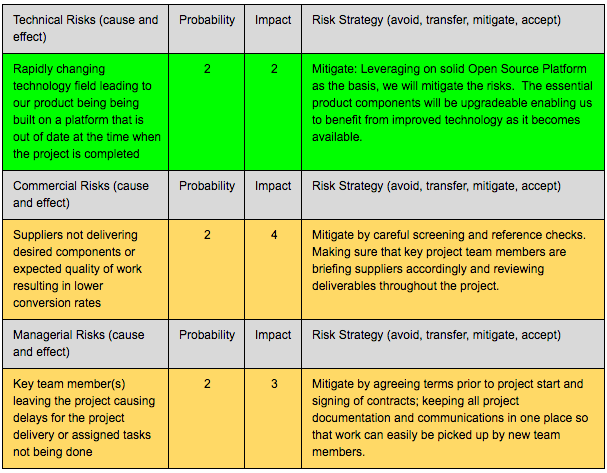
Can you really plan for the unknown unknowns? Maybe not in detail, but you can at least list the known risks, potential issues and dependencies, and their impact on the outcome. A contingency of 10% of your budget could cover your ‘unknown unknowns’. Here are a few example risks, and strategies for them, from a creative project:
Project communications, tracking progress:
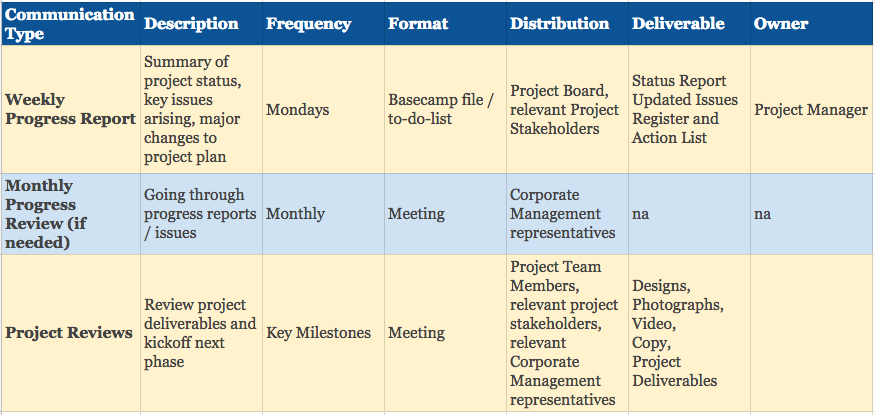
The project manager leads on communication throughout the project: making sure team members do what they said they would, sharing progress and achievements, and liaising with senior managers, suppliers and so on. If you’re lucky, you’ll get a project manager who inspires and motivates you to do what you’re supposed to do, which cuts down the nudges about things that were due yesterday. Here are a few examples of what to communicate, when, how and to whom:
Version control:
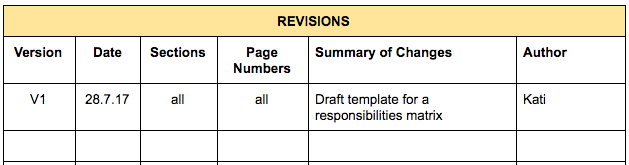
Start each document, file or spreadsheet with a revisions table, especially if it needs signing off by several people.
Project timeline, key milestones:
For a basic Gantt chart, you can probably whizz something up in a spreadsheet. For something more sophisticated, with dependencies, resources and key milestones, check out Gantter, which integrates with Google Drive. Here’s an example:
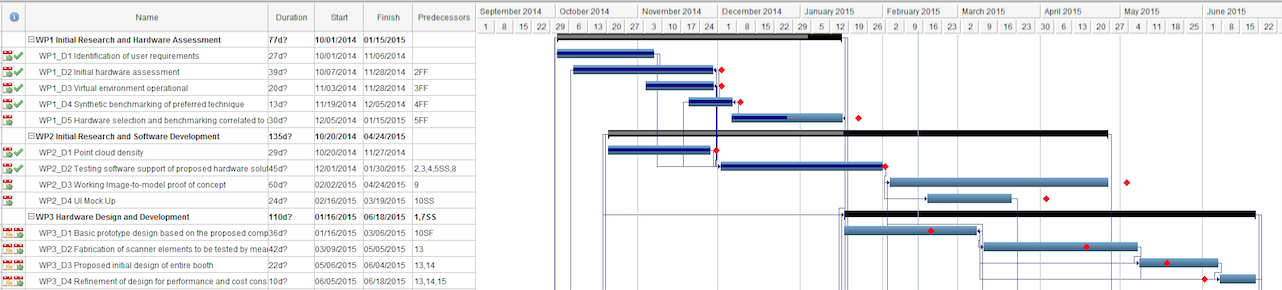
Key milestones are worth highlighting separately. Book them into everyone’s diary: they’re a great chance to celebrate achievements along the way.
We hope this gives you some pointers for your own project. If you’d like a hand from Developing Dreams turning your ideas into reality, get in touch. We have PRINCE2-certified practitioners and Scrum Masters. We also work in partnership with Project Management on Demand, because we love the founder and get along really well.
This is part 5 of a 7-part series. Missed step 1? Read A Jargon Free Anatomy of a Creative Brief. Next up: Step 6: On Budget.